
Feb 22, 2026
Git Workflow That Actually Scales
A practical Git workflow for daily product work: branch cleanly, commit clearly, review safely, and recover from mistakes fast.
Most Git tutorials list commands. This one focuses on how to use those commands in a real team without creating history chaos.
Start with a clean branch
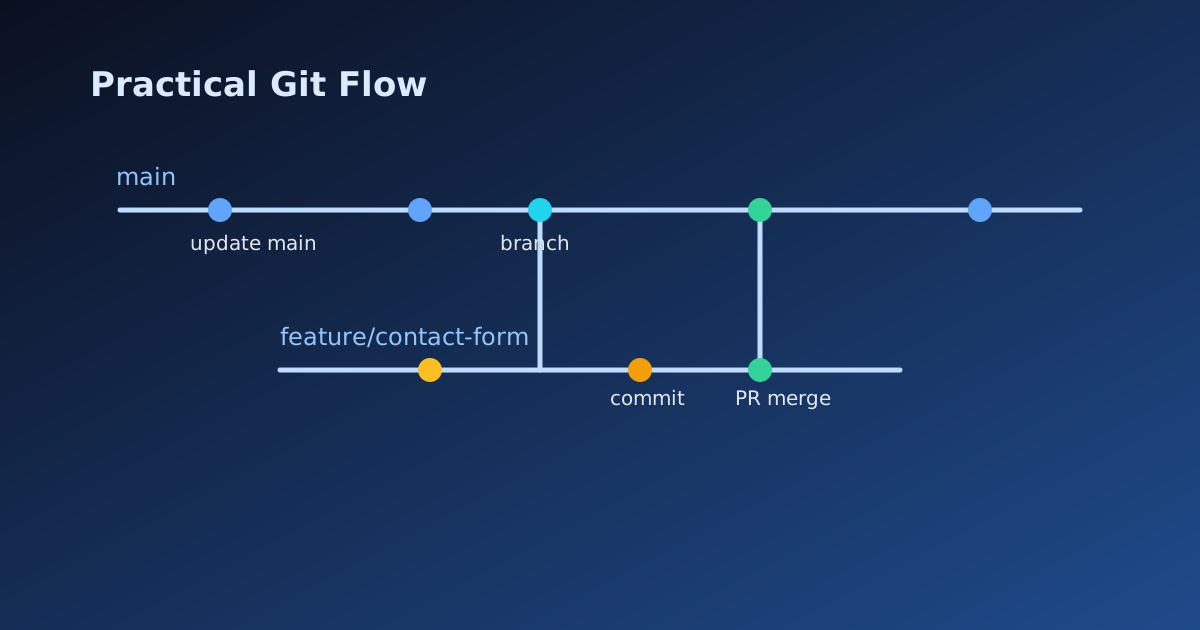
Always branch from an updated main.
git checkout main
git pull origin main
git checkout -b feat/contact-form-rate-limiter
Why this matters:
- Smaller diffs are easier to review.
- You avoid dragging stale commits into your PR.
- Cherry-picking and rollback become safer.
Introduction
Git is more than version control. It is your safety net for shipping confidently. When your workflow is consistent, debugging is faster, reviews are clearer, and releases are less stressful.
Commit with intent, not by accident
Before committing, check what actually changed.
git status
git diff
Stage related changes together. Avoid huge "everything" commits unless it is a quick spike.
git add src/routes/post.tsx src/lib/seo.ts
git commit -m "Add absolute OG image URLs for blog posts"
Good commit messages explain why the change exists.
- Good:
Fix broken canonical URL in post metadata - Weak:
updated post.tsx
Sync safely with remote
Fetch often. Push early.
git fetch origin
git rebase origin/main
git push -u origin feat/contact-form-rate-limiter
If your team prefers merge commits over rebase, keep it consistent. The team convention matters more than personal preference.
Commands you will use every week
git log
Read history with context:
git log --oneline --decorate --graph --all
git stash
Temporarily park local changes when you need to switch context:
git stash push -m "wip: contact validation"
git stash list
git stash pop
git restore
Discard an accidental local edit in a specific file:
git restore src/pages/HomePage.tsx
git revert
Undo a bad commit without rewriting shared history:
git revert <commit-sha>
Use this on shared branches. It is safer than history rewriting after others have pulled.
Pull request checklist (fast and reliable)
Before opening a PR, run this:
git statusis clean except intended files.- Rebase/merge from
mainto reduce conflicts. - Commits are logically grouped.
- Tests/lint/build pass locally.
- PR description explains user impact and risk.
Common mistakes and fixes
"I committed to the wrong branch"
git checkout correct-branch
git cherry-pick <commit-sha>
git checkout wrong-branch
git reset --hard HEAD~1
Only use hard reset if the mistaken commit was never pushed.
"I pushed something sensitive"
- Rotate the leaked secret immediately.
- Remove secret from codebase.
- Coordinate with team before force-pushing rewritten history.
Final take
Git mastery is less about memorizing commands and more about repeatable habits: clean branches, focused commits, safe sync, and clear pull requests. If you keep those four practices, your delivery speed and code quality both improve.